


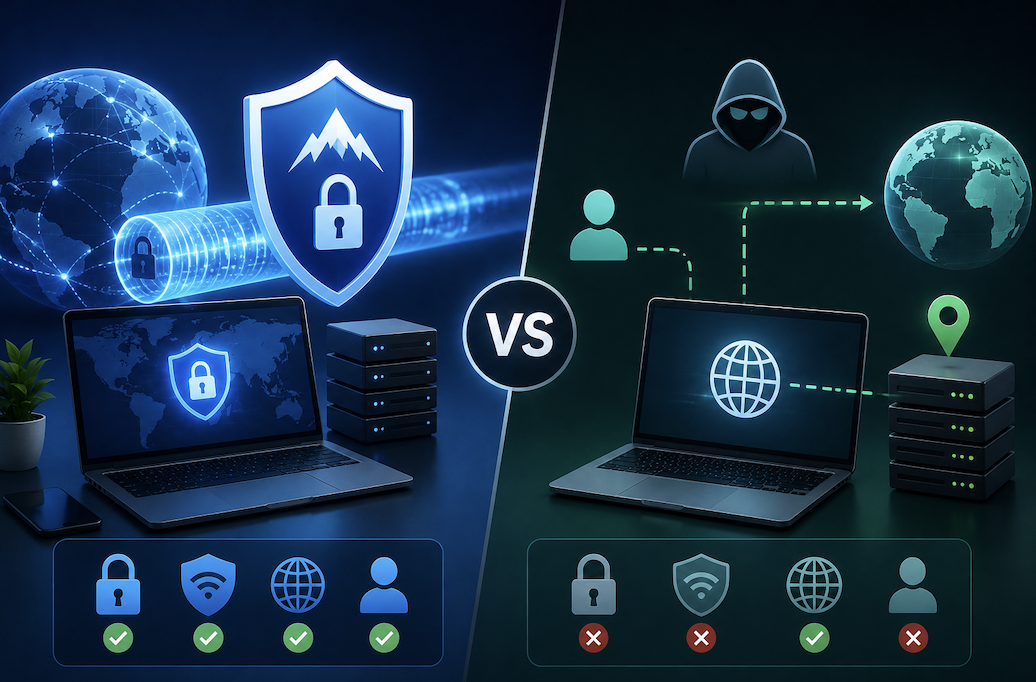
If you’ve spent any time looking into online privacy tools, you’ve probably come across both VPNs and proxies mentioned as ways to hide your location, get around content restrictions, or add a layer of privacy to your browsing. The two terms get used almost interchangeably in casual conversation, which is unfortunate, because they work in genuinely different ways and are suited to different situations. Understanding the actual difference can save you money, improve your security, and help you avoid a tool that doesn’t actually do what you need it to do.
What a Proxy Actually Does
A proxy server acts as a middleman between your device and the internet. When you connect through a proxy, your traffic is routed through that server before reaching its destination, which means websites see the proxy’s IP address instead of your own. This is useful for basic tasks like appearing to browse from a different location, getting around simple geographic restrictions, or hiding your IP address from a specific website.
The important limitation is that most proxies don’t encrypt your traffic. Your data is being redirected, but it isn’t necessarily protected from anyone monitoring the connection along the way, whether that’s your internet provider, someone on the same public Wi-Fi network, or the proxy provider itself. Proxies also typically only reroute traffic from a specific application or browser you’ve configured, not your entire device.
What a VPN Actually Does
A VPN, or virtual private network, creates an encrypted tunnel between your device and a remote server, and routes all of your device’s internet traffic through that tunnel, not just a single browser or application. Because the connection is encrypted, anyone intercepting your traffic along the way, again including your internet provider or someone on shared Wi-Fi, sees only scrambled data rather than anything readable.
Like a proxy, a VPN also masks your IP address, so websites and services see the VPN server’s location instead of your own. But the encryption is the key difference, and it’s what makes a VPN meaningfully more secure for situations where privacy actually matters, not just convenience.
Where a Proxy Makes Sense
Proxies are lightweight, often free or very cheap, and generally faster than a VPN because they aren’t doing the extra work of encrypting your traffic. This makes them a reasonable choice for low-stakes situations: quickly checking how a website looks from a different country, scraping publicly available data for a project, or getting around a simple regional restriction on content that isn’t sensitive.
Because proxies are often configured per-application, they’re also useful if you specifically want to reroute traffic from one program, like a web browser, without affecting the rest of your device’s internet connection.
Where a VPN Makes Sense
A VPN is the better choice any time actual privacy or security is part of what you’re trying to achieve. Using public Wi-Fi at a coffee shop, airport, or hotel is one of the clearest cases, since these networks are common targets for anyone trying to intercept unencrypted traffic. A VPN’s encryption protects your data even on a network you don’t trust.
VPNs are also the more reliable choice if you’re accessing sensitive information, whether that’s online banking, work systems while traveling, or personal accounts you’d rather keep private from your internet provider’s monitoring. And because a VPN routes your entire device’s traffic rather than a single application, it offers more consistent protection without needing to configure each app individually.
The Speed and Cost Tradeoff
Because VPNs encrypt everything passing through them, they typically introduce a small amount of latency compared to an unencrypted proxy connection. For most everyday browsing, this difference is barely noticeable with a reputable VPN provider, but it can matter more for latency-sensitive activities like online gaming or video calls, depending on server distance and provider quality.
Proxies also tend to be cheaper, and free proxy services are common, though it’s worth being cautious about free options in general, which we’ll cover below. Reputable VPN services typically charge a monthly or annual subscription fee, reflecting the additional infrastructure and encryption they provide.
Why “Free” Deserves Extra Scrutiny With Both
Both free proxies and free VPNs are worth approaching carefully, because running proxy and VPN infrastructure isn’t free for the provider, and a service offering it for nothing needs to make money somehow. In some cases, that means logging and selling your browsing data, which defeats the entire purpose of using the tool for privacy in the first place. In more serious cases, poorly secured or intentionally malicious free services have been found injecting ads, tracking scripts, or even malware into users’ traffic.
If privacy is genuinely part of your motivation for using either tool, it’s worth paying for a reputable, well-reviewed provider with a clear, independently audited privacy policy rather than relying on a free option whose business model isn’t transparent.
Common Misconceptions Worth Clearing Up
A VPN does not make you completely anonymous online. It hides your IP address and encrypts your traffic, which is genuinely valuable, but websites can still identify you through other means, including account logins, browser fingerprinting, and tracking cookies. A VPN is one layer of privacy protection, not a complete solution on its own.
Similarly, neither a VPN nor a proxy makes illegal activity legal or untraceable in every circumstance. Both tools have legitimate, common uses, but it’s worth understanding their actual limitations rather than assuming either one provides absolute anonymity.
How to Decide Which One You Need
If your goal is basic, low-stakes IP masking for a single application, and speed matters more than security, a proxy may be sufficient, particularly a reputable paid one. If your goal involves any real privacy or security concern, protecting your data on public Wi-Fi, keeping your browsing private from your internet provider, or securing sensitive information while traveling, a VPN is the more appropriate tool, and the added encryption is worth the modest tradeoff in speed.
For most everyday users asking this question, the honest answer is that a VPN covers a wider range of use cases more securely, and unless you have a specific, narrow reason to use a proxy instead, a reputable VPN service is generally the safer default choice.
Conclusion
Whichever option you go with, take a few minutes to configure it properly rather than just installing it and assuming it’s working. For a VPN, confirm the encryption is active by checking your IP address before and after connecting to make sure it’s actually changed, and look into whether your provider offers a kill switch feature, which cuts your internet connection entirely if the VPN drops unexpectedly, preventing your real IP from being exposed accidentally.
For a proxy, double check which specific application or browser it’s actually routing traffic through, since it’s easy to assume your whole device is protected when only one program is actually using the proxy connection.
Taking a few extra minutes to verify your setup is working as expected is a small step that prevents a false sense of security, which is arguably worse than using no privacy tool at all if you’re making decisions based on protection you don’t actually have.
- You May Want to Know Best Free Antivirus Software
Frequently Asked Questions
1. Can I use a VPN and a proxy at the same time?
Technically yes, though it’s rarely necessary and can introduce additional latency without a clear benefit for most users. If you have a specific reason for layering both, it’s worth understanding exactly what each one adds to your setup rather than assuming more tools automatically means more protection.
2. Does a VPN slow down my internet noticeably?
With a reputable, well-maintained VPN service, the slowdown is usually minor and not noticeable for everyday browsing. Server distance matters, connecting to a server farther from your actual location typically introduces more latency, so choosing a server geographically closer to you, when location isn’t the point, generally offers better speeds.
3. Is it legal to use a VPN?
In the vast majority of countries, yes, VPNs are completely legal and widely used by individuals and businesses alike for legitimate privacy and security reasons. A small number of countries restrict or ban VPN use, so it’s worth checking the specific laws of any country you’re traveling to or living in if this is a concern.
4. Will a VPN protect me from all types of online tracking?
No. A VPN hides your IP address and encrypts your traffic, but websites can still track you through cookies, browser fingerprinting, and account logins. For more comprehensive privacy, a VPN works best combined with other habits, like using privacy-focused browser settings and being selective about which accounts you stay logged into while browsing.
5. How do I know if a VPN provider is trustworthy?
Look for providers with a clear, independently audited no-logs policy, meaning a third party has verified the company doesn’t retain records of your browsing activity. Established providers with a long track record and transparent ownership are generally a safer bet than newer or unknown services, especially ones offering unusually generous free tiers.
